One-Click Financial Statements
& AI-Driven Insights
How a mid-sized manufacturer cut financial statement prep from 20 hours to under 2 - and turned reporting from a compliance task into a strategic function.

Month-End Reporting Shouldn't Be a Marathon
For most mid-market companies, financial statement preparation is the bottleneck of month-end close. Skilled professionals spend days on formatting, formulas, and copy-paste - work that adds zero analytical value.
The data exists in the ERP. The chart of accounts is defined. The statement formats are known. Yet every month, the same manual process repeats: export, format, calculate, narrate, review. And every month, the same errors creep in.
EPM tools like OneStream and Planful serve large enterprises. But manufacturers and mid-market companies running SAP, Oracle, or NetSuite still depend on Excel workflows that haven't fundamentally changed in 20 years.
Meet the Client
A mid-sized manufacturer with $85M in revenue, running SAP as their ERP. Three plant locations, two legal entities, and a 5-person finance team responsible for all internal and external reporting.
Every month, the controller and a senior accountant spent 15-20 hours preparing financial statements. They exported raw GL data from SAP, copied it into a master Excel workbook, mapped accounts to statement line items, built variance calculations, and drafted management commentary paragraph by paragraph.
The process was fragile. One formula break could cascade through the entire workbook. Version control was a constant headache - "Final_v3_REVISED_Melissa.xlsx" was a running joke that nobody found funny.
The irony: the team had excellent data in SAP. Every transaction, every journal entry, every cost center allocation was there. The problem was extraction and presentation - the gap between raw GL data and polished, audit-ready financial statements.
The Monthly Reporting Process
The CFO received financials on Day 10 or later - meaning the first 10 days of every month were a data blackout period. Leadership made decisions based on intuition, not data. And when ad-hoc requests came in, the team had to regenerate everything from scratch.
How We Built the AI Solution
We designed a one-click financial reporting engine fully integrated with SAP. The system connects directly to SAP's GL module and generates complete, formatted financial statements - with AI-powered narratives - in minutes.
One click. Full P&L, balance sheet, cash flow statement, variance analysis, and management narrative. What used to take 20 hours now takes under 2 - and the quality is higher and more consistent because it's generated from live data, not manually copied cells.
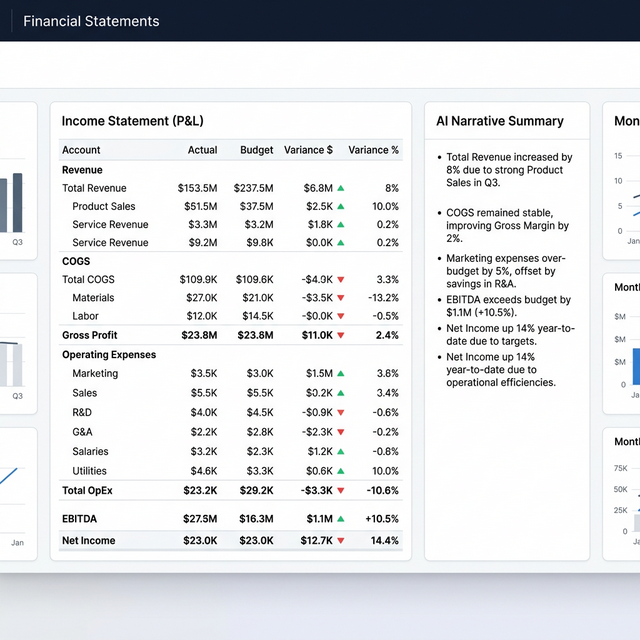
One-Click Statements
Income statements, balance sheets, and cash flow - formatted, reconciled, and ready to review
AI Narrative Engine
Management commentary auto-generated with key findings, trends, and actionable recommendations
Multi-Period Comparisons
Compare vs. budget, prior year, and rolling averages - all calculated automatically
Audit-Ready Output
Every number traces back to its SAP source with full drill-down capability and complete audit trail
Before vs. After
Results That Transform the Function
(was 15-20 hrs)
annually
formatting effort
from efficiency
The real transformation wasn't speed - it was the shift from compliance to strategy. With reporting handled in hours instead of days, the controller now spends month-end on analysis and recommendations instead of formatting. The CFO gets financials on Day 2 and can make real-time decisions with current data.
Still Building Financials in Excel?
If your team spends 15+ hours per month on statement prep, the bottleneck is the process - not the people. We'll show you exactly what can be automated.
Get a free workflow analysis →8-Week Rollout
Weeks 1-2: Connect
SAP GL data integration, chart of accounts mapping, and multi-entity data normalization.
Weeks 3-4: Build
Statement generation engine, variance calculation logic, and multi-period comparison framework.
Weeks 5-6: Narrate
AI narrative engine, commentary templates, trend detection, and recommendation logic.
Weeks 7-8: Launch
Audit trail configuration, user training, parallel testing vs. manual process, and production go-live.
"Month-end reporting went from our biggest headache to a 2-hour process. The AI-generated narratives are better than what we wrote manually - they're clearer, more consistent, and our CFO now gets reports on Day 2 instead of Day 10."

Frequently Asked Questions
Stop Spending 20 Hours
on Month-End Reports
Book a free 30-minute call. Walk away with a workflow map, quick-win list, and a start-here plan - whether you work with us or not.
Book a free call →