How I Migrated 3,000+ QBO Bills To Ramp Via API
In Less Than A Week
An API-led AP transition that moved bill data, invoice images, PO detail, and approval-ready context from QuickBooks Online into Ramp, then fully reconciled AP aging before final handover.

Why This Was Not A Normal QBO To Ramp Migration
The hard part was not copying bill headers. The hard part was moving payable work without stripping out the human context finance actually uses: the invoice image, the PO story, the approval path, and the aging logic that proves AP is still right after cutover.
Searchers looking for QBO to Ramp bill migration, QuickBooks Online to Ramp AP migration, or how to move bills from QBO to Ramp usually imagine a fast import job. What they actually need is a controlled operating transition. Owners want approvers to see the real invoice before they click approve. Controllers want the AP aging in the new system to tie back to the old system. AP leads want PO-backed bills to keep enough context that receipt discipline and three-way-match behavior do not quietly disappear during the move.
- Bill records alone are not enough. If the image does not come with the bill, approvers are back to chasing PDFs in the old system.
- PO-backed bills are not really preserved if only the total amount moves and the line-level purchasing story gets flattened.
- Reconciliation has to be done at vendor and due-bucket level, not just by comparing one grand total and hoping nothing material is hiding underneath.
- The migration has to be deterministic. AI can accelerate review, but the accounting outcome still needs tested rules, duplicate controls, and repeatable tie-outs.
That was the real assignment. We were not just moving accounts payable software. We were moving an active AP population into a better approval environment without creating a hidden cleanup project for the controller two weeks later.
Just as important, we followed the same Ledger Summit principle we use across automation work: build the tools first, test them hard, and only then let automation run. AI helped us accelerate mapping review, exception clustering, and document-package inspection, but nothing was allowed to post or release for approval until the rules passed controlled tests.
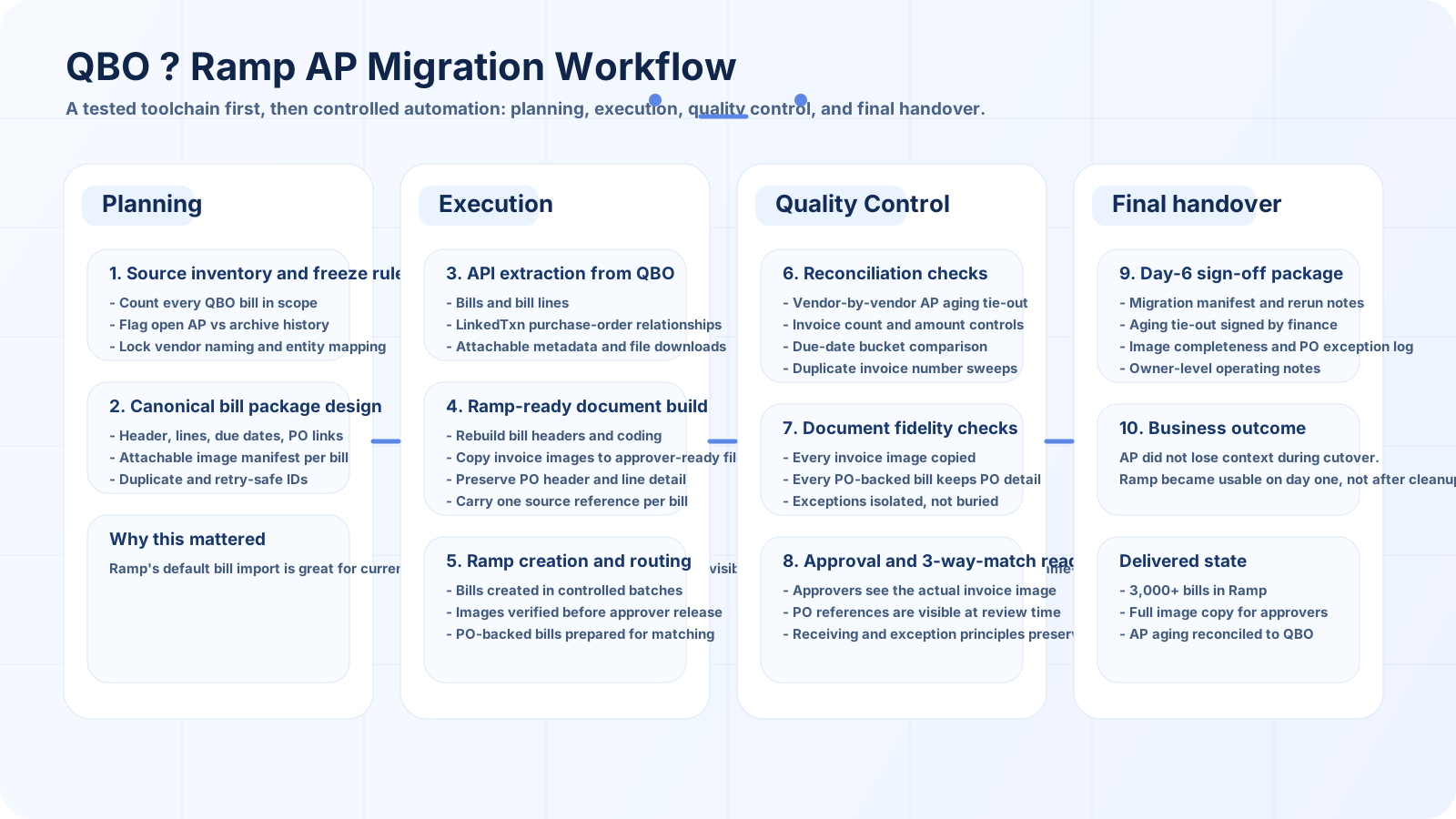
The Migration Was Run As A Four-Stage Operating Plan
Planning, execution, quality control, and final handover were treated as separate workstreams because that is how you stop a migration from becoming a rushed upload followed by days of finance cleanup.
The planning phase locked the bill universe, source rules, vendor normalization logic, and the exact sign-off condition. Execution moved the bills, the images, and the PO detail through a tested toolchain. Quality control reconciled the result at the same level finance would actually use to trust it. Handover made sure the new Ramp environment was usable on day one, not just technically populated.
Approver visibility risk - solved before cutover
We treated invoice images as part of the bill package itself because approvers should not have to leave Ramp and hunt through QBO just to verify what they are approving.
PO context risk - preserved at line level
We carried forward the PO story that matters in practice: header reference, line descriptions, quantities, pricing, and the context needed to preserve three-way-match discipline.
Aging mismatch risk - reconciled before release
The success condition was a clean AP aging tie-out between QBO and Ramp, not a vague statement that the totals looked close enough.
Automation risk - controlled with tested tools
We did not let AI or automation improvise accounting state. Deterministic rules, duplicate controls, and rerunnable batches came first.
The Rule On Day One: Build The Migration Tools First
The shortest path would have been to hope the platforms handled the details for us. That is also the path most likely to leave AP with missing images, broken PO context, duplicate bills, and a controller who cannot explain the aging difference after go-live.
Instead, we built a small but very deliberate migration toolchain. Each part had one job, one output, and one testable failure mode. That mattered because once you are moving thousands of payable documents, the quality of the transition depends less on how fast you can move rows and more on how cleanly you can prove that each bill still means the same thing after the move.
LedgerBridge Bill Extractor
Pulled bill headers, dates, due dates, vendor references, coding, and line detail from QBO into one canonical source inventory with stable migration IDs.
Attachment Relay
Mapped every bill to its source document package, downloaded the invoice images, validated file completeness, and prepared the files for Ramp-side bill visibility.
PO Match Compiler
Converted linked purchasing context into a bill-ready structure so PO-backed invoices would not arrive as disconnected totals with their operational story missing.
AP Aging Tie-Out Console
Compared QBO and Ramp by vendor, invoice, outstanding amount, and due bucket so the sign-off point was real finance evidence rather than a screenshot and a guess.
AI had a role, but it was deliberately narrow. It helped group similar vendor names, flag likely duplicate invoice patterns, and surface the small exception populations that deserved human review. It did not decide whether a bill was valid, whether a vendor balance tied out, or whether a document should be released into approvals. Those steps stayed rule-based and fully tested.
How The Bill, Image, And PO Context Moved Together
The migration package for each bill had to be richer than a normal export because the goal was not just to recreate a payable balance. The goal was to recreate an approvable bill.
Each bill package carried five layers of information: the bill header, the line-level accounting detail, the linked PO context, the invoice image set, and the source-control metadata that let us rerun or isolate the bill if anything failed. That design let us keep the financial number, the approval evidence, and the migration trace together in one repeatable flow.
Operationally, execution happened in batches. We did dry runs first, verified image completeness and coding behavior, ran a delta strategy for late source changes, and only released bills into the live approval workflow after QC had cleared the batch. That kept the project fast without making it reckless.
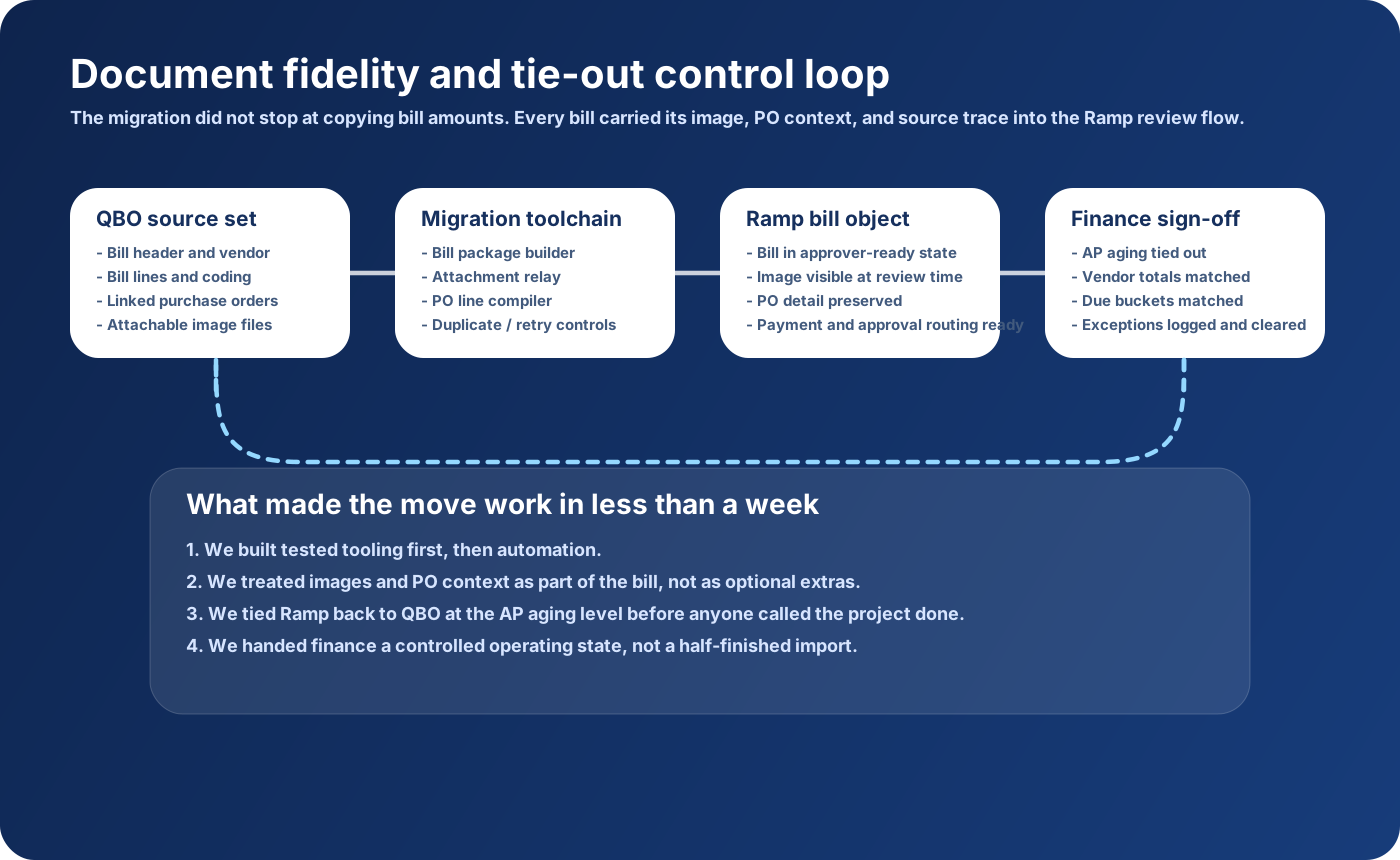
What Stayed With Each Bill
- Source bill reference, vendor, invoice number, bill date, due date, and outstanding amount.
- Line descriptions, coding logic, amounts, and approval-relevant context instead of one flattened summary number.
- Linked PO references and the detail needed to preserve the purchasing story behind the payable.
- Invoice image files copied forward so approvers could review the actual document inside Ramp before approving.
- Migration-run identifiers, checksum logic, and exception-state handling so the process stayed rerunnable and auditable.
How We Preserved Image Visibility, PO Detail, And Three-Way-Match Discipline
The client did not want a technically successful migration that made approvals worse. They wanted a better AP operating state, which meant the bill had to stay understandable to both accountants and business approvers.
That is why we took the image copy requirement seriously. An approver who can open the Ramp bill and instantly see the source invoice behaves very differently from an approver who has to trust a summary record or request a PDF from AP. That one detail alone changes cycle time, confidence, and the number of unnecessary escalations.
The same logic applied to purchase orders. We did not want PO-backed bills to arrive in Ramp as detached liabilities with no purchasing context. So we preserved the PO detail that finance and operations actually use to review a bill: references, lines, quantities, and the evidence needed to keep the three-way-match principle alive. In plain English, the invoice still had to make sense against what was ordered and what was received.
Approver-ready document view
Every migrated bill reached Ramp with the actual invoice image attached so finance leaders, department heads, and owners could review the source before approving.
PO detail preserved
PO header and line context were carried forward so the bill still told the purchasing story, not just the accounting result.
Three-way-match principle maintained
We preserved the review logic that matters: approved order, receipt evidence, then invoice. The platform changed; the discipline did not.
Exceptions stayed visible
We isolated mismatches and edge cases into a review queue instead of quietly dropping detail or forcing the team to discover issues after cutover.
What We Reconciled Before Anyone Called The Project Done
The handover gate was very simple: if AP aging in Ramp did not reconcile back to QBO in a way the controller could trust, the project was not finished.
That standard sounds obvious, but in practice it is where many migrations get sloppy. Teams compare the total AP balance, see that the number is close, and move on. We did not allow that. We tied the migration out by vendor, by invoice population, by due bucket, and by the document evidence that made each payable reviewable.
That tie-out discipline is what made the speed believable. The project moved quickly because the tooling was prepared and the QC conditions were explicit. It did not move quickly because we skipped the accounting proof.
What The Client Had By Day Six
moved into Ramp
and handover completed
for approver visibility
left at sign-off
The client ended the week with a live Ramp AP environment that people could actually use. Bills were present. Images were present. PO detail was present. Approval logic made sense. The controller could tie Ramp back to QBO without relying on hopeful totals or a notebook of caveats.
That is the practical difference between a migration and a handoff. A migration moves records. A handoff gives the business a stable operating state. In this case, AP could start working in Ramp immediately because the transition respected both the accounting proof and the human approval workflow.
For CEOs and owners, the win was speed without mystery. For controllers and AP leaders, the win was control without drag. For the approvers who only want to open a bill and understand what they are being asked to approve, the win was simple: the evidence was right there.
How The Migration Was Delivered
Phase 1: Planning and scope lock
We froze the bill universe, documented vendor rules, mapped the image and PO context requirements, and defined the only success condition that mattered: a clean AP aging tie-out between QBO and Ramp before handover.
Phase 2: Build and run the migration batches
The toolchain extracted bills, attachments, and PO references from QBO, assembled canonical bill packages, and recreated the payable population in Ramp through controlled, rerunnable batches.
Phase 3: Quality control and exception clearance
We ran vendor-level and due-bucket aging tie-outs, verified image completeness, checked PO-backed bills, and isolated any exception before the bills were released into the live approval state.
Phase 4: Final handover
Finance received a reconciled Ramp environment, migration manifest, exception log, rerun notes, and owner-level operating guidance so the new process was usable immediately, not after another round of project cleanup.
"We expected a messy AP cleanup project. Instead we had 3,000-plus bills, the invoice images, the PO detail, and a clean aging tie-out in Ramp before the first real approval cycle started."

Frequently Asked Questions
Need to move AP from QBO to Ramp without losing control?
Book a free call. We will map the bill population, attachment strategy, PO continuity, approval logic, and reconciliation checkpoints required to make the move usable on day one instead of painful for the next close.
Book a free call →