How Ledger Summit Built
Tool Box AI Into A
Unified Finance Platform
A deep look at how the new Tool Box AI product was designed for finance and accounting teams: one platform for approvals, workflow execution, ERP and payment integrations, audit-ready controls, and AI-assisted automation that replaces disconnected spreadsheet work.

Why Ledger Summit Chose To Build A Platform Instead Of Another Point Tool
Most finance teams do not suffer from one missing feature. They suffer from fragmented execution.
Procure-to-Pay lives in one set of tools, cash application and collections live in another, project cost capture lives somewhere else, and the accounting truth still gets assembled through exports, approvals, side spreadsheets, and detective work at month-end. The new Tool Box AI product was created to collapse that fragmentation into one operating model.
The product brief did not call for a narrow calculator or a single workflow widget. It called for a unified finance operations portal that could centralize Procure-to-Pay, Order-to-Cash, Time-to-Pay, and Project Financials in one platform, while still working across different ERPs and payment tools. In practice, that means Tool Box AI keeps one business process and translates it into the right accounting or payment action for each connected system.
That is what makes this build notable. Tool Box AI was scoped as a full finance operating system: workflow orchestration, approvals, integrations, security, audit support, dimensional governance, analytics, and AI assistance in one product instead of scattered across separate point tools.
This page documents that product build effort. It is not a client migration story. It is the story of how Ledger Summit translated a broad finance operating model into a real platform structure with modules, controls, APIs, data models, workflow definitions, and implementation scaffolding. Where technical terms matter, they are used here to explain how the finance process is controlled, not to make the product sound more complex than it is.
The Finance Stack Tool Box AI Was Built To Replace
The target user was not a developer looking for a clever feature. It was a finance team trying to keep approvals, documents, cash, payroll, projects, and audit support from splintering across too many systems.
Tool Box AI was designed for AP clerks, AR analysts, controllers, CFOs, project managers, payroll admins, compliance teams, and external vendors or customers who need one portal with role-aware access and traceable workflows. The underlying business problem was recurring and familiar:
- Documents and approvals move faster than accounting controls, so finance ends up reconciling decisions after the fact.
- ERP systems hold balances, but operational steps like intake, routing, coding, and exception management still live in email, chats, and spreadsheets.
- Integrations move records without always preserving audit evidence, dimensional consistency, or retry-safe posting behavior.
- Project, payroll, and procurement data often share the same accounting consequences but arrive through different systems and different governance standards.
- AI is often added as a layer of summarization instead of being embedded into intake, matching, coding, prediction, and exception handling.
Tool Box AI was conceived as an answer to that pattern: a system where workflow, controls, integrations, and analytics belong to the same product instead of becoming a patchwork around the ERP.
The Product Thesis Behind Tool Box AI
The product was built around one simple idea: finance software should not stop at recording the result. It should govern how the result gets created.
That thesis shaped the platform from the first architectural decisions. Tool Box AI was defined as API-first, event-driven, multi-tenant, cloud-native, and audit-first. In plain terms, that means the system was designed to connect cleanly with other tools, respond to workflow events as they happen, keep each customer in its own secure environment, run reliably as an online platform, and preserve a full record of who did what and when.
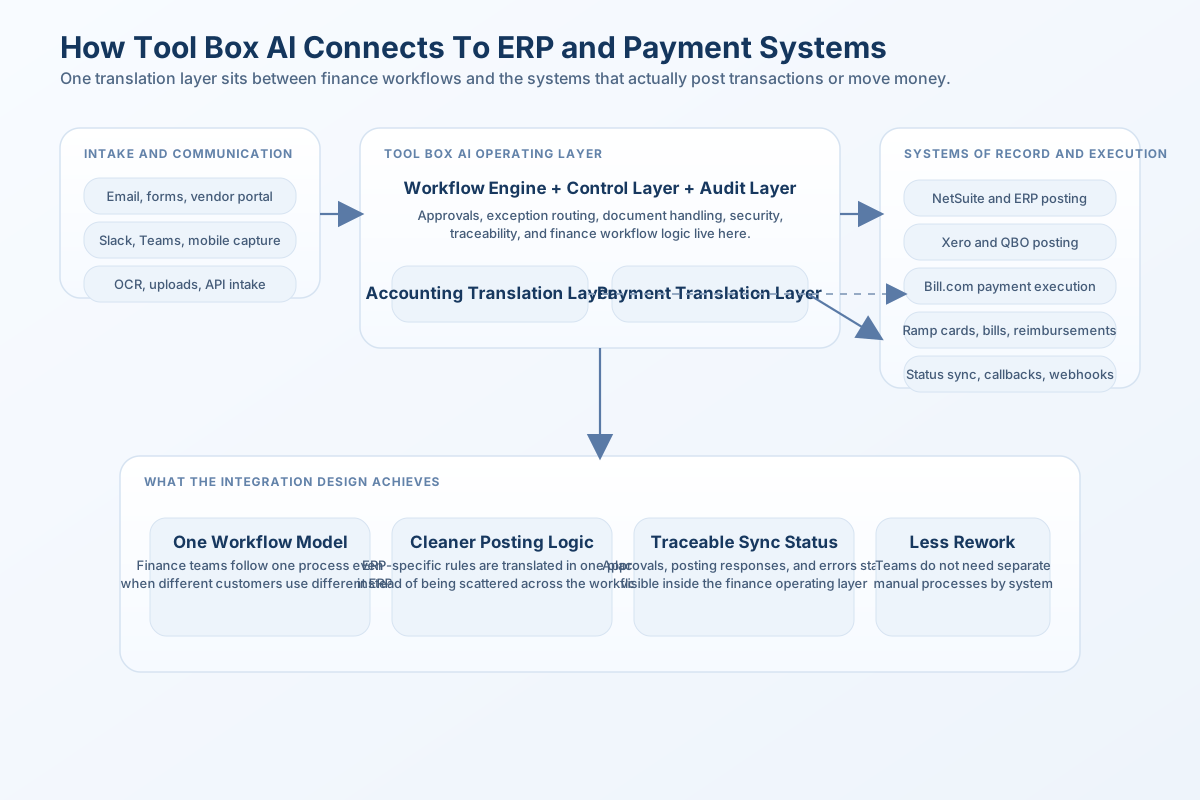
Rather than force the business into one accounting stack, the platform introduced two important translation layers. The Accounting Abstraction Layer is essentially a common posting and sync model for NetSuite, Xero, and QuickBooks Online. The Payment Abstraction Layer does the same for Bill.com and Ramp. That lets Tool Box AI keep one approval and workflow model even when the system of record changes underneath it.
The platform direction does not need a software screenshot to make the point. The important idea is the operating model: one command surface for approvals, workflow visibility, exception handling, analytics, and integration status.
Instead of showing a borrowed-looking ERP screen, the article keeps the emphasis on how Tool Box AI is structured and what it is meant to replace. The value of the product comes from the workflow design, control architecture, and finance logic behind the interface, not from mimicking another vendor's software aesthetic.
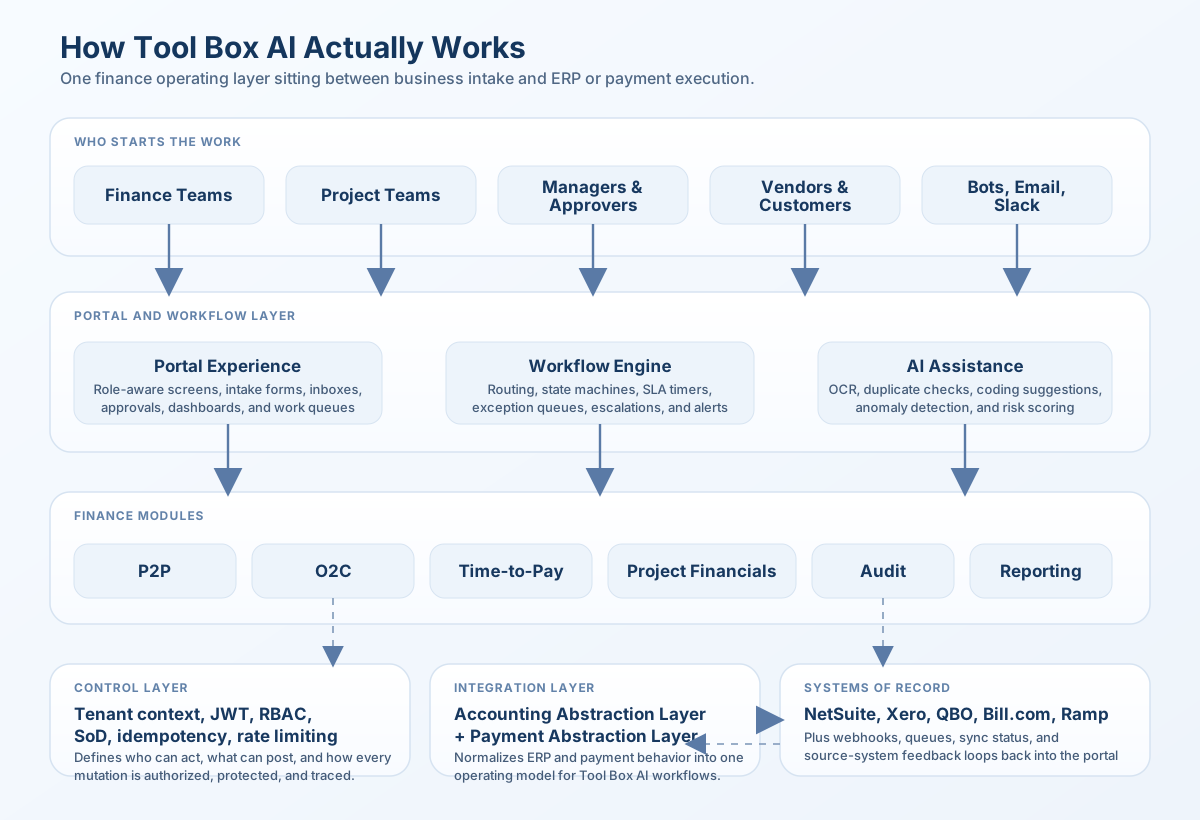
Separate customer environments by design
Each customer was planned to operate inside its own protected data boundary, with database-level separation, customer-specific usage controls, and request handling that always knows which company and workflow it belongs to.
Audit-first workflow model
Every material mutation was planned to carry user identity, timestamps, before/after values, and resource lineage so compliance is part of the operating model.
ERP-agnostic business logic
Business workflows were designed to remain stable even when the accounting backbone changes from NetSuite to Xero or QuickBooks Online.
AI embedded into execution
OCR, matching, coding suggestions, forecasting support, and anomaly detection were specified as working parts of the process itself, not as reports that appear after the work is already done.
How Tool Box AI Was Actually Structured
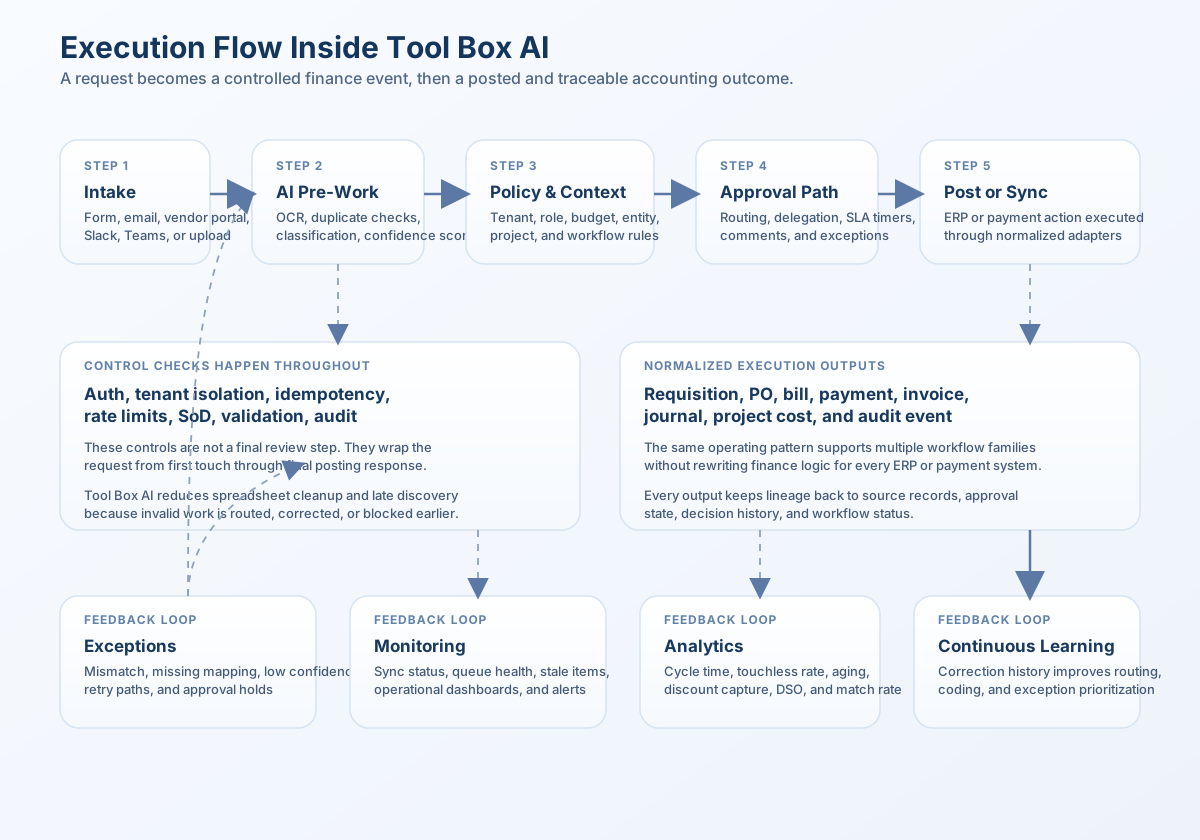
The initial build did not start from UI mockups. It started from the platform basics that finance workflows need if they are going to stay reliable under scale, integrations, and audit pressure.
The core platform layer introduced the controls that make automated finance work dependable: consistent system settings, structured logging, clear error handling, request tracing, rate limiting, duplicate-prevention safeguards, secure authentication, role-based permissions, segregation-of-duties checks, audit services, managed database connections, in-memory control services, and background workflow processing for tasks that should continue after the first user action.
Configuration and environment validation
System settings were validated up front so database access, caching, authentication, rate limits, browser security rules, feature flags, and sync timeouts behave consistently across environments.
Structured logging with context
Every request can be tied back to the customer, user, and workflow involved, while sensitive information is redacted and failures are captured in a way operations and compliance teams can review later.
Hierarchical error handling
Validation errors, permission issues, sync failures, database problems, timeouts, and customer-specific exceptions were separated on purpose so the system can fail safely and route the issue to the right place.
Signed login tokens, sessions, and API keys
The authentication layer covers signed login tokens, session renewal, API key access, and the ability to extend into multi-factor authentication for stronger control over sensitive workflows.
Role-based access and segregation of duties
The access model includes 10 roles, 23 detailed permissions, record-level action checks, and segregation-of-duties rules so the same person cannot both create and approve sensitive finance actions when that would violate policy.
Duplicate prevention and retry safety
Duplicate-prevention logic was designed for payments, sync jobs, and other high-risk actions where network retries happen, so the platform can try again without creating a duplicate bill, payment, or posting.
Customer-aware database access
Database helpers make sure each query stays tied to the right customer, each transaction stays inside the right scope, and operational teams can see connection health before performance issues affect finance users.
Rate limiting and abuse controls
Customer-by-customer and endpoint-by-endpoint throttling protects logins, APIs, and inbound system messages from overload while still telling connected systems when to slow down and retry.
That foundation matters because finance platforms fail in predictable ways when these controls are deferred. Customer boundaries blur. Retries create duplicates. Manual overrides go unaudited. Approval rules drift away from posting rules. External integrations start acting like the source of truth instead of the accounting control framework. Tool Box AI was explicitly designed to avoid that trap.
The Major Feature Families Inside Tool Box AI
Procure-to-Pay
Requisitions, policy-driven approvals, purchase orders, vendor onboarding, invoice capture, invoice matching, approvals, bill pay, and AP reconciliation live in one governed path.
Order-to-Cash
Quotes, sales orders, invoicing, cash application, collections, customer follow-up reminders, credit controls, and bank reconciliation were designed as a single O2C module family.
Time-to-Pay
Timesheet capture, approvals, payroll export, journal posting, and reconciliation are positioned as controlled accounting workflows instead of disconnected HR handoffs.
Project Financials
Assessment, dimensional setup, cost capture, revenue and billing, and dashboards give project-driven teams one financial control surface.
Accounting Abstraction Layer
One normalization layer for NetSuite, Xero, and QuickBooks Online keeps finance logic stable even when the ERP underneath differs.
Payment Abstraction Layer
One normalized payment layer for Bill.com and Ramp lets the workflow engine own execution, approvals, and status tracking across payment rails.
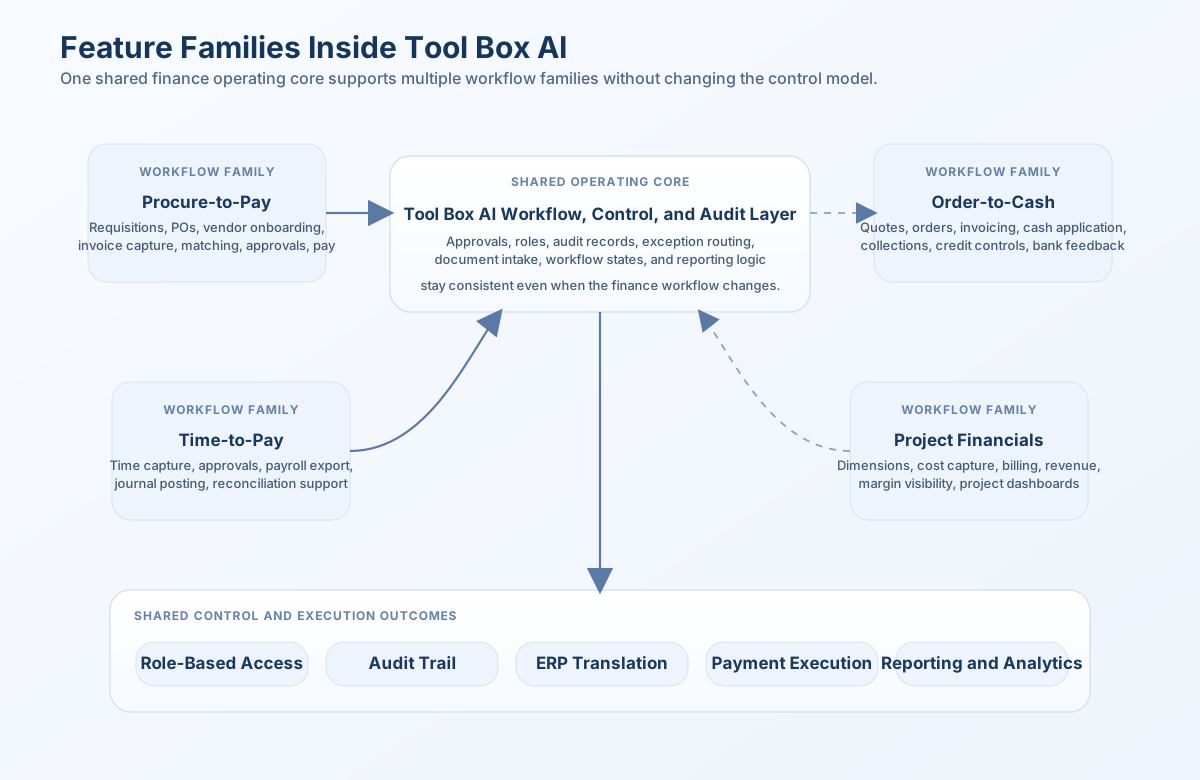
In other words, Tool Box AI is not one workflow. It is a controlled operating system for finance work.
The most impressive part of the build is not just the breadth of module coverage. It is that the platform was defined with a shared operating language across those modules: approvals, audit records, chartfield and dimension control, integrations, exception routing, automation opportunities, and customer-specific security all reappear as platform capabilities rather than isolated feature experiments.
The First Major Workflow Family Was Detailed End To End
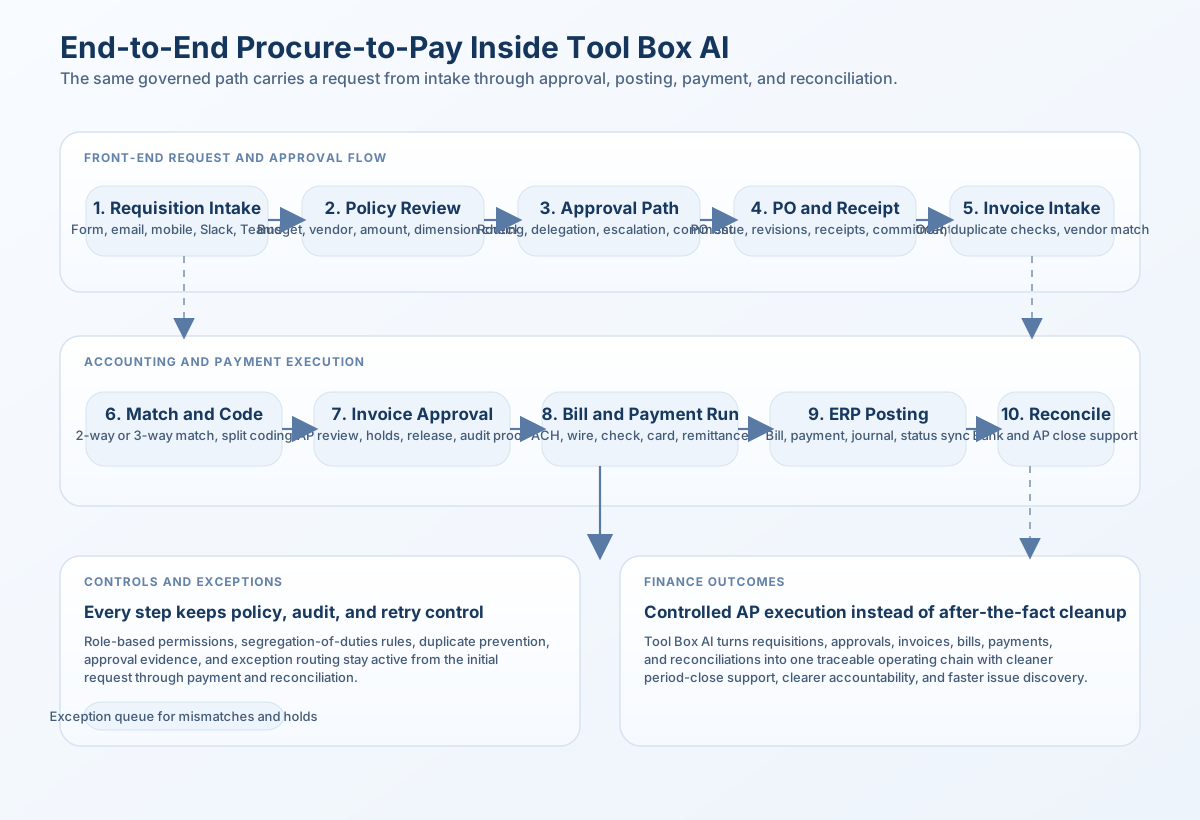
The current build documentation goes deepest in Procure-to-Pay, and it shows what Tool Box AI means by product completeness.
The P2P module alone was documented across a large module design, data model, API specification, workflow set, and code scaffolding. That work produced 10 defined sub-modules, 40+ endpoints, 35+ PostgreSQL tables, 40+ workflow event definitions, and full attention to approvals, exceptions, integration points, and compliance traceability.
Purchase Requisition Intake
Dynamic intake forms, email-to-requisition parsing, Slack or Teams shortcuts, budget checks, duplicate detection, attachments, and mobile requester support.
Approval Matrix and Policy Engine
Visual rule building, amount and vendor routing, delegation, response-time timers, simulation mode, auditability, and auto-approval logic for low-risk items.
Purchase Orders
PR-to-PO conversion, blanket POs, revision control, partial receipts, vendor acknowledgements, commitment tracking, tax calculation, and ERP sync.
Vendor Onboarding
Self-service registration, duplicate checks, W-9 and banking collection, taxpayer ID validation, sanctions screening, risk scoring, and merge or deactivation workflows.
Vendor Compliance and Risk
Expiration monitoring, re-certification, insurance validation, ESG or diversity tagging, and vendor performance scorecards.
Invoice Capture
OCR, email ingestion, confidence scoring, vendor auto-match, duplicate detection, batch uploads, mobile capture, and routing based on how certain the system is about the extracted invoice data.
Invoice Matching and Coding
2-way and 3-way match logic, tolerance rules, split coding, exception routing, auto-GL suggestions, and visibility into invoices that are still waiting to be matched or resolved.
Invoice Approvals
Multi-level workflows, one-tap approvals, batch processing, holds, releases, escalation logic, comments, and collaboration channels.
Bill Pay and Payment Run
ACH, check, wire, and card execution with scheduling, early-payment discount optimization, remittance, FX handling, and void workflows.
Bank Reconciliation
Daily feed import, auto-matching, exception workbench, period locking, approval workflows, and multi-currency reconciliation handling.
How O2C, Time, And Project Features Extend The Same Logic
O2C: Quote to invoice
Quote configuration and pricing, sales orders, invoice management, revenue recognition, cash application, collections, payment reminders, credit management, and AR visibility were all planned as part of one O2C operating chain.
O2C: Revenue and collections controls
Revenue timing, collection tasking, customer aging, cash matching, and bank-reconciliation feedback loops keep front-office activity connected to accounting consequences.
Time-to-Pay: Time as accounting data
Timesheets, approvals, payroll export, journal creation, and reconciliation convert labor activity into governed finance events instead of post-close cleanup.
Project Financials: Dimensions and margin visibility
Project assessment, entity and dimension setup, cost capture, revenue and billing, and dashboard visibility put operational execution and accounting on the same model.
Portal roles for internal and external users
Controllers, AP teams, AR teams, project managers, buyers, payroll admins, vendors, and customers all fit into the access design through role-aware interfaces.
Shared event model across modules
Workflow state changes, approvals, syncs, exceptions, and audit events were designed to flow through one shared event model, so downstream processes react in a standard way instead of each module needing its own custom logic.
That continuity is important. A unified platform is only useful if requisitions, invoices, sales orders, payroll journals, and project cost postings can all live under the same rules for user identity, customer separation, approvals, and explainability. Tool Box AI was built with exactly that kind of continuity in mind.
The Features That Make The Product Connect To The Real World
NetSuite adapter support
NetSuite support covers SuiteTalk REST, OAuth, transaction sync, and posting patterns that respect how NetSuite expects finance transactions to be created and updated.
Xero adapter support
Xero support covers REST API integration, OAuth 2.0 login handling, webhooks, rate-limit awareness, and normalized records so finance teams can use the same workflow even in a lighter ERP environment.
QuickBooks Online adapter support
QuickBooks Online support covers transaction sync, custom approval tracking, change-detection sync patterns, and export-friendly normalization so smaller teams still get governed workflows.
Bill.com integration
Vendor, bill, payment, and remittance flows were designed to sync through one shared payment connection model rather than a one-off AP connector.
Ramp integration
Corporate cards, expenses, reimbursements, and bill-pay data can be normalized into shared workflow and approval models across the platform.
Communication and intake surfaces
Email, Slack, Teams, OCR services, webhooks, and queue-based sync were part of the product vision because finance work usually starts before anything reaches the general ledger.
Where Intelligence Was Added To The Workflow Instead Of The Marketing
The AI layer inside Tool Box AI was designed to reduce manual work where finance teams actually feel friction most: intake, matching, coding, exceptions, routing, and forward-looking decision support.
Invoice document reading and extraction
AI-powered invoice capture with confidence scoring, template learning, and fallback routing helps AP teams get usable invoice data earlier, before coding and approval work even starts.
Duplicate and anomaly detection
Duplicate requisitions, duplicate invoices, policy overrides, weak support, and unusual transaction patterns are all candidates for risk-based alerting.
Vendor and category suggestions
Historical patterns can guide intake, routing, and classification so requesters and AP teams spend less time correcting unclear vendor names, categories, and coding choices.
Auto-GL coding
Tool Box AI was scoped to learn from prior coding behavior, corrections, and vendor patterns to accelerate invoice coding and exception handling.
Approval and payment optimization
Risk scoring, queue prioritization, early-payment discount decisions, and timing optimization turn the platform into a decision assistant, not just a workflow tracker.
Predictive finance insights
Budget utilization forecasts, reconciliation acceleration, margin visibility, and advanced reporting were explicitly called out in later roadmap phases so the platform can improve both execution and finance insight over time.
What Tool Box AI Changes In The Operating Model
What The Current Build Already Demonstrates
specified so far
designed with tenancy and audit fields
fully outlined in the current design wave
mapped for status changes and downstream actions
Those numbers matter not because they look large in a table, but because they show operating intent. Tool Box AI is being built with defined endpoints, data models, workflow states, integration contracts, and compliance assumptions. That is the difference between a slide-deck concept and a product that can support real finance execution.
How The Product Was Sequenced For Delivery
Phase 1: Foundation and P2P core
Establish the shared platform controls, authentication, audit services, ERP and payment translation layers, and the first critical P2P workflows including requisitions, approvals, vendor onboarding, invoice capture, matching, and payment execution.
Phase 2: O2C expansion and operational finance
Add invoicing, cash application, bank reconciliation, collection reminders, expenses, and broader exception-driven finance operations on the same shared control model.
Phase 3: Advanced commercial and revenue controls
Extend into quote configuration and pricing, sales orders, revenue recognition, collections, and credit management so customer-side operations become as structured as AP-side operations.
Phase 4: AI optimization and advanced reporting
Layer in predictive analytics, more intelligent workflow guidance, e-invoicing readiness, and deeper management visibility once the operational data foundation is stable.
Public Ledger Summit Tools That Echo The Product Direction
Financial Close Control Calendar
See how Ledger Summit thinks about controlled execution, task ownership, and earlier issue discovery across the close.
Chart of Accounts Compliance Checker
Check the dimensional and structural consistency that a platform like Tool Box AI depends on for reliable automation.
Segregation of Duties Risk Matrix
Explore the same access-control and conflict concepts that sit underneath the platform's role-based permission design.
GL Detail Analyzer
Inspect transaction behavior and unusual patterns when integrated workflows or close support need deeper review.
Prepaid Expense Amortization
Reflects the same ledger-native schedule thinking that shows up in the product's treatment of recurring accounting support.
Account Flux Analysis Tool
Support financial review and exception analysis with the same explainability mindset used throughout the platform architecture.
Frequently Asked Questions About The Build
Want a finance platform built around workflow, controls, and explainability?
Book a free call and we will map the approvals, integrations, audit requirements, and workflow priorities that should shape your own finance operating system in language your finance team can actually use.
Book a free call →